WooCommerce cart
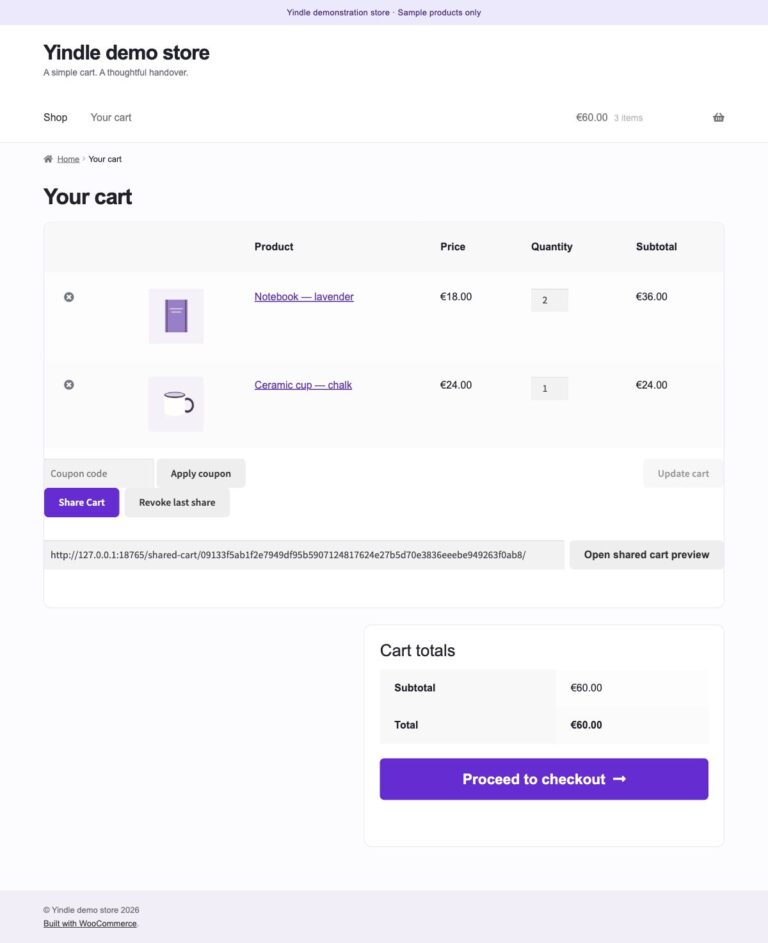
Share Cart by Yindle
Let customers temporarily share a WooCommerce cart, preview its current contents and deliberately merge or replace it.
Start sharing for free. Choose Pro to save and print carts.
Free download. No account needed.
Free 1.0.2
Upgrading from Free 1.0.0 or 1.0.1?
The Free plugin is now named Yindle Share Cart. Make a backup and turn off “Delete data on uninstall” in the old Free edition. Then deactivate the old edition and install this ZIP. Check your settings and shared links before deleting the old edition. You can also leave the old edition deactivated.
Free & Pro
Choose what your store needs.
Free includes the complete sharing workflow. Pro adds personal saved carts and printing.
| Feature | Free | Pro |
|---|---|---|
| Share a cart with an expiring link | Included | Included |
| Preview current prices and stock | Included | Included |
| Choose to merge or replace a cart | Included | Included |
| Revoke links and share as a guest | Included | Included |
| Classic cart and Cart Block | Included | Included |
| Save named carts | Not included | Included |
| Manage saved carts in your account | Not included | Included |
| Printer-friendly view | Not included | Included |
Start with Free
Free download. No account needed.
Free 1.0.2
Upgrading from Free 1.0.0 or 1.0.1?
The Free plugin is now named Yindle Share Cart. Make a backup and turn off “Delete data on uninstall” in the old Free edition. Then deactivate the old edition and install this ZIP. Check your settings and shared links before deleting the old edition. You can also leave the old edition deactivated.
Do more with Pro
Choose your number of websites above for the current Pro price. Installed features keep working when your update and support licence expires.
View Pro and pricingWhat you can achieve
Less friction in your WooCommerce process.
Share with one link
Create a temporary, revocable link to the contents of a cart.
Review first, then choose
Show the recipient current prices and availability before merging or replacing the cart.
Works without an account
Sharing and importing work for guests. With Pro, logged-in customers can name and save carts.
Before you start
Compatibility and considerations.
View technical details
- The licence covers the selected number of standalone WordPress websites; WordPress Multisite is not supported.
- Tested with WordPress 7.1, WooCommerce 11.1 and PHP 8.4.18; validate your active store configuration on staging first.
- Works with the classic cart and the WooCommerce Cart Block.
- Pro offers a printer-friendly view with items, SKUs, quantities, discounts and totals.
- Before launch, test existing links, caches, the active theme and the mobile view.
Next step